Blogging Income Report – August 2018 – Making $292 from Blogging

It’s the start of another month, which means it’s also time for another blogging income report and update!
As usual, I always aim to be 100% transparent and share as many blogging metrics, income screenshots, or tidbits of info as possible.
While blogging income reports are a dime a dozen these days, I think the truly honest reports are becoming harder to find amidst swarm of ‘blogging about blogging’ niche writers.
Thus, while this is getting repetitive, I will persevere and continue to write these reports because they help me stay motivated and will hopefully provide other writers or content creators with a realistic road map of what to expect.
So, onto the details!
Blogging Income for the Month of August
I’m going to start including my income numbers at the top of these reports since I figure these stats are more interesting to other bloggers.
Despite only publishing 3 posts, August was the highest month of earning I have ever had.
In August, WebMonkey or syndicated content from this blog resulted in $229.52.
Here is how the income breaks down:
Google AdSense Blog Earnings – $166.17
The bulk of my August earnings were driven by increased traffic to WebMonkey (I’ll get to this later) and an increase in my Google AdSense average RPM (it was around $9.49 for the month, which is crazy).
An increase in traffic bringing in additional display advertising revenue isn’t surprising, but I was happy to see my RPM creep up.
I also noticed CPC bids (cost-per-click) were appearing in my AdSense breakdown alongside CPM (cost per thousand impression) bids, which is new as far as I can tell.
My gut is telling me that my recent posts on college related topics like college side hustles you should start might have attracted some new display publishers in the education vertical, increasing my average RPM with back to school pumped advertising budgets.
While this is just my guess, I think this month has proved that AdSense can provide publishers with strong RPMs depending on their niche and the season/advertising economy.
I’m still striving to reach the 25,000 session mark for Mediavine, but for now, I’m happy to start making money with Google AdSense every month!
Additionally, I also think this increase in earnings shows it is feasible to start your own blog and generate income within 6 months to 1 year.
I recently published a post that outlines the steps I have taken to create a $100/month blog, and I think posts like that, coupled with these income reports, definitely prove that blogging isn't dead or impossible.
The money isn't easy and blogging takes hundreds of hours of work to pay dividends, but the effort is worth it in the end!
Content Syndication on Medium – $63.35

I’m actually getting fed up with the content syndication system on Medium, and I expect my earnings to dip on the platform very dramatically over the next few months (until I can write some original content on the platform).
2 months ago, I noticed that my phone farming guide and ‘how to make money on Medium’ guide were starting to receive organic traffic on Medium and were actually cannibalizing my own blog posts.
Upon checking the source code for my stories, it was evident that my phone farming guide did not actually have a rel=canonical tag, and was therefore not informing Google to attribute WebMonkey as the original source of the article.
My guide on how to make money on Medium was formatted correctly, but it was still receiving traffic from Google…and a lot of it:
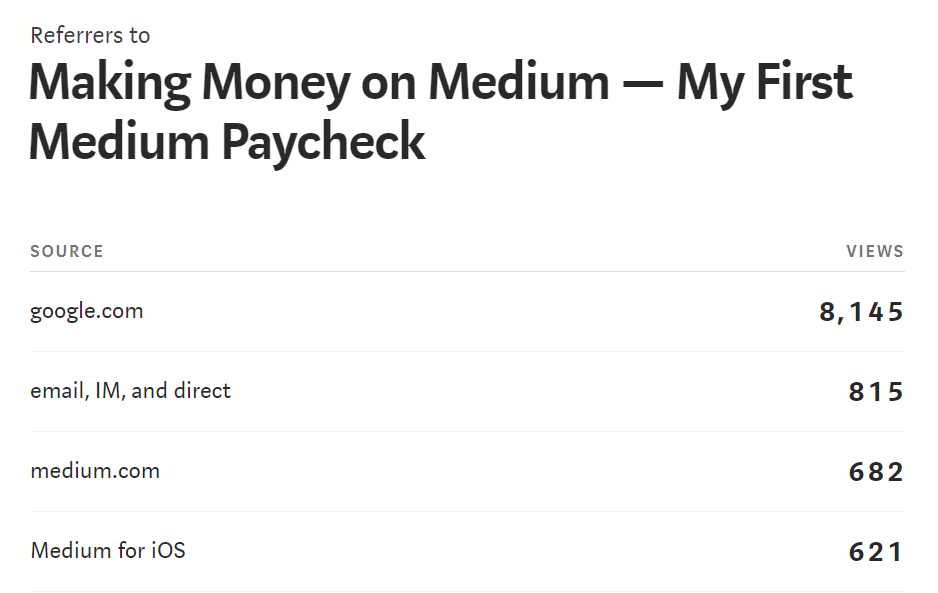
After contacting Medium’s support team, I was assured that all the tags would be fixed and both of my articles would resume their rank 1 position on Google.
After 2 more weeks, nothing changed.
I have finally hidden both of those Medium stories so they won’t appear on Google, and this has corresponded with an increase in organic traffic to these 2 articles:
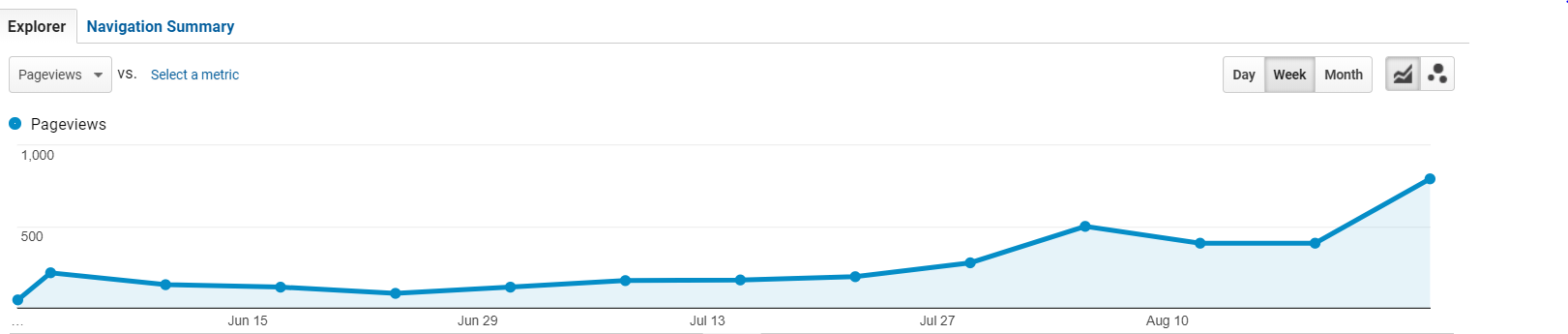
In other words, it seems like the cannibalization is finally over!
While making passive income every month from writing on Medium was nice, I am frustrated that my blog lost several thousand views to the platform.
At the end of the day I think content syndication on Medium is a valuable tool to explore for other bloggers.
Additionally, the Medium support team is pretty stellar and very timely with responding to complaints or questions.
However, something was just not adding up for my 2 successful Medium posts, and it was finally time to pull the plug on my highest earners.
If you actively engage in content syndication on Medium, I suggest taking a look into your Medium stats to make sure your referrals aren't comprised of significant amounts of organic traffic.
August still saw some decent passive income from Medium, which is always welcomed, but I expect the next few months will only result in a trickle of money since I've hidden my most popular stories.
However, I'm confident the increase in traffic I'm now receiving to my blog and AdSense earnings will make up for it!
Blogging Affiliate Income – $63
August was also my highest month of revenue in terms of affiliate marketing!
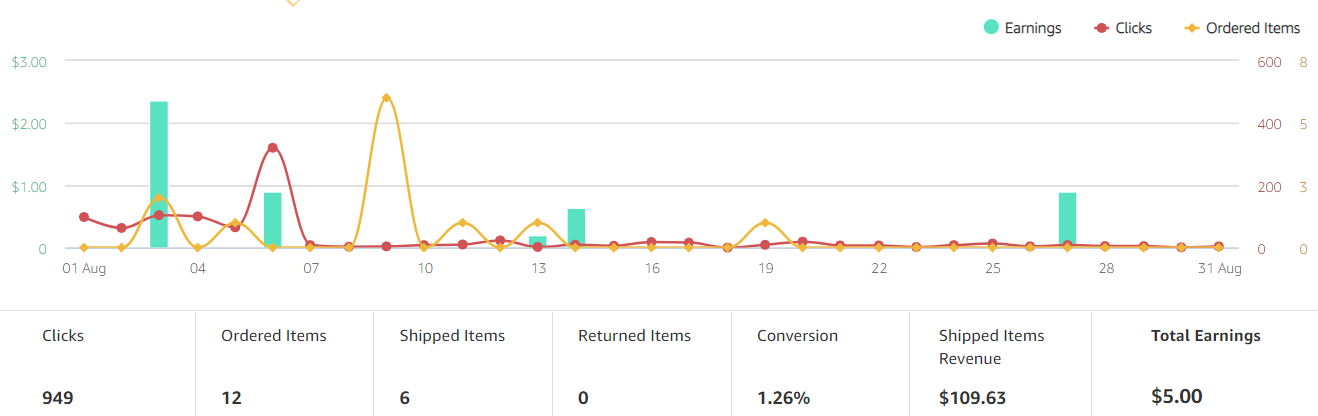
To date, I’ve never focused on affiliate marketing on my blog as a source of revenue, and the peppering of Amazon Affiliate links rarely make more than $5 a month in income.
In the Amazon Affiliate department, this month was no different; I earned $5 in Amazon affiliate income this month:
However, I’m very excited to have earned in income from 2 Shopify referrals.
This was completely unexpected income for me, but I believe I’ve discovered some new potential.
A few months ago I published my guide on how to start a dropshipping business in 48 hours, and wrote what I believe is a transparent and reasonable guide that outlines what to expect with dropshipping.
Since then, Google has steadily been increasing my ranking on dropshipping related terms, and the traffic to that specific article keeps on increasing:
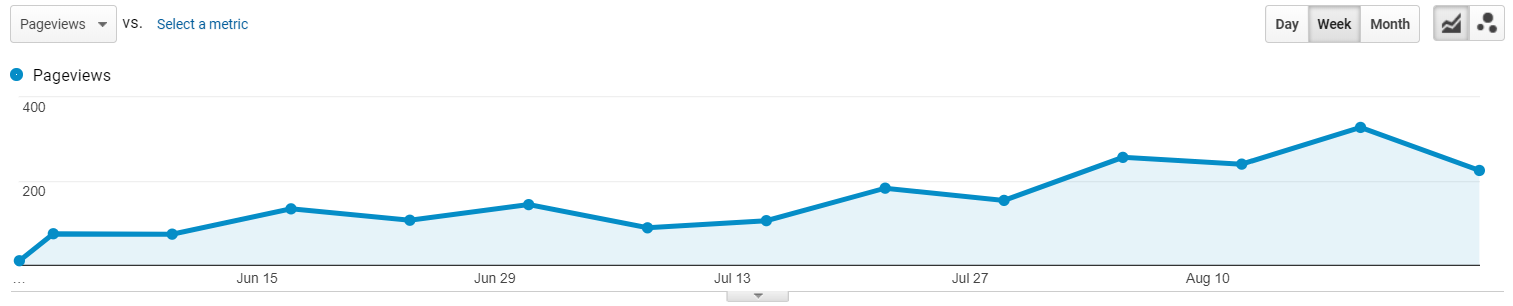
Referring new dropshippers to Shopify is definitely my new favorite affiliate marketing effort because it provides value for both parties: I get paid, and the dropshipper gets 14 days of a free trial and some tips from my article!
Additionally, the Shopify affiliate program is quite lucrative.
If one of my trial referrals becomes a paid Shopify member, I can receive up to 2 months of their subscription fee.
This month 2 readers subscribed for the $29/month Basic Shopify plan, which resulted in the $58 of income:
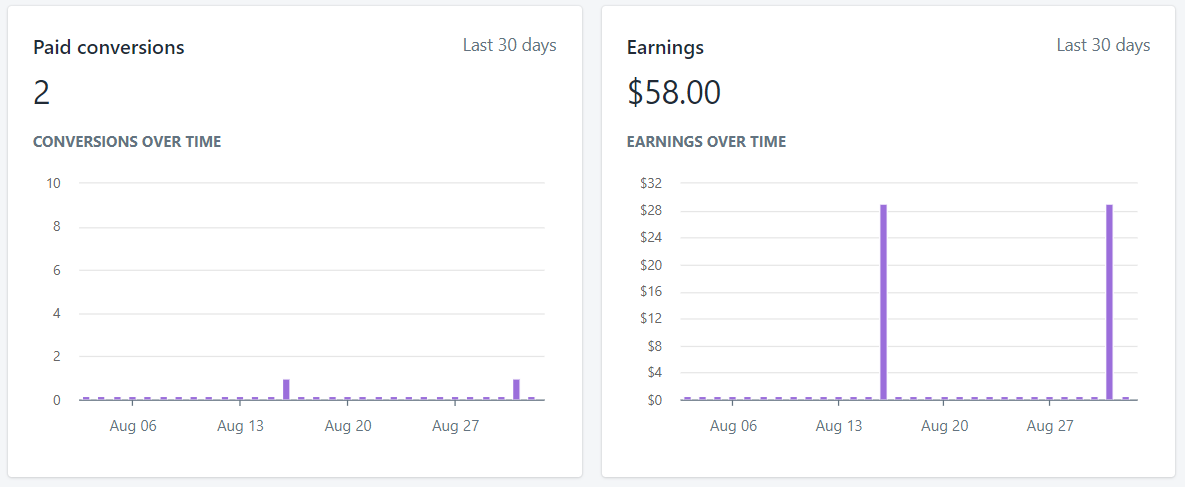
I currently have a few other active trial users, and if the existing users continue to run their dropshipping business I will receive their second month of subscription fees as well!
Ultimately, if you are a content creator who promotes Shopify related content or dropshipping material, I highly suggest looking into the Shopify Affiliate Program.
It’s a generous program that also provides readers with some value, and that’s the way a decent affiliate program should work!
Additional Passive Income from Phone Farming – $40.23
I decided to purchase 1 more device for my phone farm, and it was even ‘free' since my phone farm earnings paid for it!
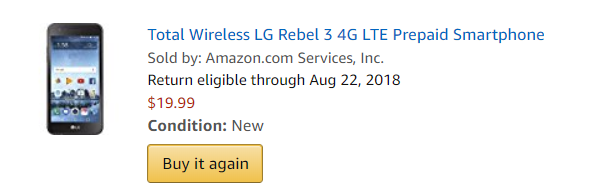
My other devices have all been banned from MobileXpression, but my new device has allowed me to rejoin the program (I'll stick to the rules this time to avoid a ban).
In terms of my phone farming routine, not much has changed.
Currently I am running a mixture of:
- Embee Meter CX.
- Panel App.
- MobileXpression.
- YooLotto
- Perk TV
- App Trailers.
- CashMagnet.
- Swagbucks TV.
I bounce around between the apps for the most part, although App Trailers and CashMagnet are my most stable performers.
If you live in Canada or the United States I'd definitely suggest giving phone farming some consideration! Just don't go crazy and purchase more than a few phones at once to ensure phone farming works in your area.
Blogging Traffic Growth & Next Steps
I keep reiterating the importance of following SEO fundamentals and having some patience, and August has certainly highlighted this point!
Somehow, WebMonkey received more than 20,000 page views in the month of August:
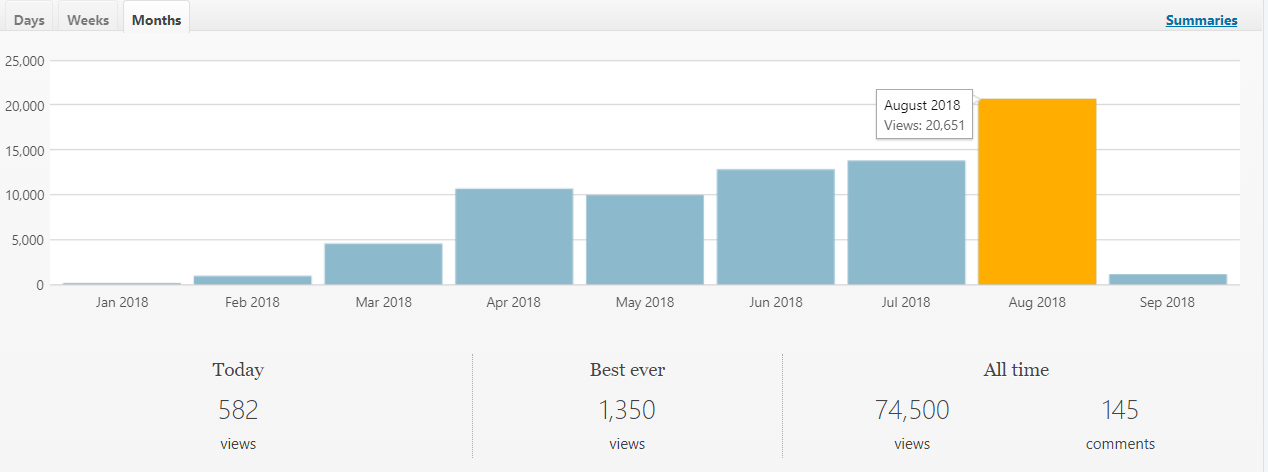
I don't know if it was the Google update last month, my recent backlinking efforts, or the reduction of Medium cannibalization that has caused this jump in traffic (it was probably a combination of factors).
However, I do know that this proves the simple fact that if you create high quality content, time is your friend.
In any case, this growth is exciting because it tells me things are going in the right direction and that more readers are finding my content (and hopefully gaining some value from reading it).
Additionally, this new milestone also means we are even closer to reaching the 25,000 session mark and applying to Mediavine!
I realize that I should really be tracking sessions and not page views since Mediavine is interested in session count, so here's a snapshot of my August monthly session count:
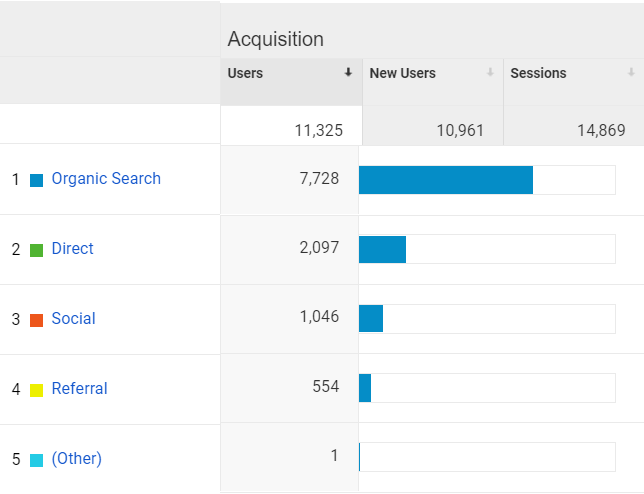
I'm still around 10,000 monthly sessions away from beginning the application process, but I'm over 50% of the way there which is another nice milestone to hit!
So, what's next?
Well, I'm not entirely sure, but I have a few ideas!
I just returned to Canada from a wonderful vacation in the Dominican Republic, so I am certainly itching to create some new content and push for a strong month of blogging.

I definitely have a renewed dropshipping itch since editing my dropshipping guide and earning some Shopify affiliate income, so it might be time to relaunch my store or start an entirely new storefront in the near future!
Additionally, I also want to publish part 3 in my series on the best phone farming apps since it's been a while since I published my 2nd post in that series, and I'd love to introduce some new apps and discuss the future of the industry.
Aside from that, I'm not entirely sure what the next few months will contain, but I'm definitely excited for the journey.
For those of you who continue to read, comment, or share, thank you so much for the support!
Catch you guys in the next post!
If you want to read other posts in my series of blog reports, you can find the list of my previous income reports here.